USB OTG Adapters: Turning Your Phone into a Computer

What Is USB OTG?
USB On-The-Go (OTG) allows a smartphone or tablet to act as a USB host — meaning you can connect USB devices directly to your phone without a computer. Plug a flash drive into your phone to transfer files. Connect a keyboard for faster typing. Hook up a camera to import photos. USB OTG transforms your phone into a mini computer.
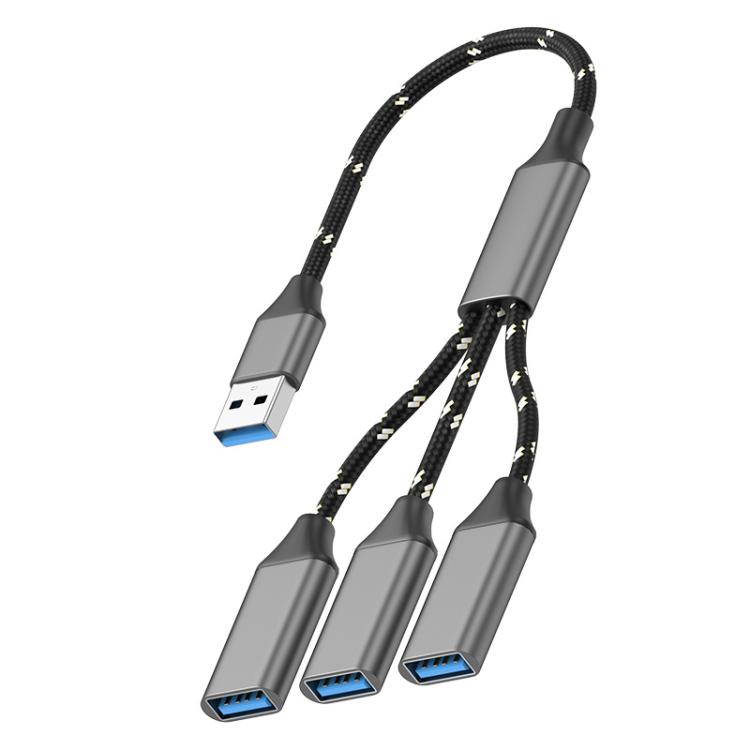
At USBToUSB, we carry the 3-in-1 OTG Expander Splitter Dock Station, which supports USB-A to USB-A, USB-C to USB-A, and USB-A to USB-C connections. Here’s what OTG can do for you.
What You Can Do with USB OTG
Connect USB Storage Devices
Plug a USB flash drive or external hard drive directly into your phone. Transfer photos, videos, and files between your phone and external storage without using a computer. This is especially useful for freeing up phone storage when traveling.
Connect a Keyboard and Mouse
Type long emails or documents on a full-size keyboard connected to your phone. Use a mouse for precise navigation — useful for spreadsheet editing or remote desktop apps. Android and iPadOS support both keyboard and mouse input through OTG.
Import Photos from a Camera
Connect your DSLR or mirrorless camera via USB to import photos directly to your phone. This is perfect for photographers who want to edit and share photos on Instagram or other social platforms without waiting to get to a computer.
Play Games with a Controller
Many Android games support USB game controllers via OTG. Connect an Xbox or PlayStation controller to your phone for console-quality gaming on the go.
Connect MIDI Instruments
Musicians can connect MIDI keyboards and controllers to their phone or tablet for mobile music production. Apps like GarageBand and FL Studio Mobile support MIDI input via USB OTG.
Use Ethernet for Stable Internet
Connect a USB Ethernet adapter via OTG for wired internet on your phone. This is useful in areas with poor Wi-Fi or for online gaming where low latency is critical.
The 3-in-1 OTG Expander: Versatility in One Device
Our 3-in-1 OTG Expander Splitter Dock Station is unique because it supports multiple connection types:
- USB-A to USB-A: Connect standard USB devices to phones with USB-A OTG support
- USB-C to USB-A: Connect USB-A devices to modern phones with USB-C ports
- USB-A to USB-C: Connect USB-C devices to older phones with USB-A ports
This versatility means one OTG adapter works with virtually any phone and any USB device combination. No more buying different adapters for different devices.
Phone Compatibility Check
Android Phones
Most Android phones support USB OTG. To check:
- Settings → Storage → Check for “USB OTG” or “USB Drive” options
- Or download a free “USB OTG Checker” app from Google Play
- Samsung Galaxy S series, Note series: Full OTG support
- Google Pixel: Full OTG support
- OnePlus, Xiaomi, OPPO: Most models support OTG
iPhone and iPad
iPhone 15/16 series (USB-C): Support OTG natively — connect USB devices directly
iPhone 14 and earlier (Lightning): Require a Lightning to USB Camera Adapter for OTG functionality
iPad Pro (USB-C): Full OTG support
iPad (Lightning): Requires Lightning adapter
Tablets
Most Android tablets with USB-C ports support OTG. iPad Pro/Air with USB-C have native OTG support. Samsung Galaxy Tab series fully support OTG.
How to Use the OTG Expander
- Connect the adapter: Plug the OTG adapter into your phone’s charging port
- Connect USB device: Plug your USB flash drive, keyboard, or other device into the adapter
- Access files: On Android, use the Files app to browse connected storage. On iPhone, the Files app automatically detects USB storage.
- Disconnect safely: Before removing the adapter, eject the USB device in your phone’s file manager to prevent data corruption
Power Limitations
Phones provide limited power through their USB ports — typically 500mA at 5V (2.5W). This is enough for:
- USB flash drives (100-200mA) ✓
- Keyboards and mice (50mA each) ✓
- USB game controllers (50-100mA) ✓
But insufficient for:
- External hard drives (500-800mA) ✗ — may work on some phones, may not on others
- USB fans and cooling pads ✗
- USB-powered LED strips ✗
For external hard drives that require more power, use a powered USB hub between the OTG adapter and the hard drive.
File System Compatibility
USB storage devices must use a compatible file system:
- FAT32: Works with all phones and tablets (4GB file size limit)
- exFAT: Works with most modern Android phones and iPhone/iPad (recommended)
- NTFS: Read-only on Android (most phones); read-only on iPhone
- APFS/Mac OS Extended: Not supported by Android or iPhone
For cross-platform compatibility, format your USB drive as exFAT.