Spring Coiled USB Extension Cables for Cars: Tangle-Free Driving

The Car Cable Problem
Your car’s USB port is on the dashboard. Your phone is mounted on the windshield. The cable between them is either too short (phone disconnects when you move it) or too long (excess cable drapes over the gear shift and tangles with the steering wheel controls). This is the universal car cable problem — and coiled USB extension cables solve it elegantly.
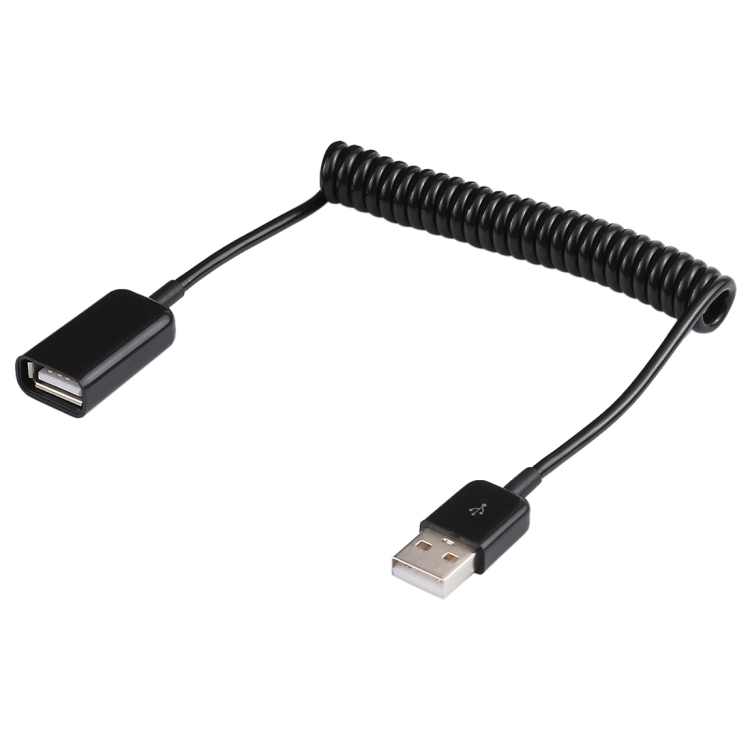
We carry the 1m USB-A Male to USB-A Female Spring Coiled Cable, which is ideal for automotive use. Here’s why.
Why Coiled Cables Are Perfect for Cars
Automatic Length Adjustment
The spring coiled cable stretches when you pull your phone closer and retracts when you set it back. No excess cable to manage — the cable is always exactly the right length. When you disconnect your phone, the cable retracts to about 20cm and sits neatly on the dashboard.
No Tangled Cables
Standard cables dangle, wrap around the gear shift, and get caught on the handbrake. A coiled cable stays compact and close to the dashboard, eliminating the safety hazard of loose cables in the driver’s area.
Stress Relief on USB Ports
Car USB ports are often fragile — they’re mounted on infotainment systems that aren’t designed for cable stress. The spring mechanism in a coiled cable absorbs tension, preventing the connector from being yanked when the phone moves.
Heat Resistance
Quality coiled cables use TPU (thermoplastic polyurethane) jacket material that withstands the high temperatures inside a car during summer. Standard PVC cables can soften and deform in a hot car; TPU maintains its shape and spring properties.
Setting Up a Coiled Cable in Your Car
Step 1: Identify Your Car’s USB Port
Most modern cars have USB-A ports. Some newer models have USB-C ports. Check your car’s manual for port locations and types. Our spring coiled cable is USB-A male to USB-A female, so it works with any car that has USB-A ports.
Step 2: Connect the Coiled Cable
Plug the male end into the car’s USB port. The female end will accept your phone’s charging cable. The coiled cable extends up to 1m, reaching from the dashboard to a windshield-mounted phone holder.
Step 3: Connect Your Phone Cable
Plug your phone’s existing cable into the female end of the coiled extension. Use a short cable (0.3m or less) between the coiled extension and your phone to minimize additional cable length.
Step 4: Route the Cable
Route the coiled cable along the dashboard edge, using cable clips if necessary. The coiled design naturally stays close to surfaces, making routing simpler than with rigid cables.
USB 2.0 Speed: Is It Enough for Car Use?
Our spring coiled cable is USB 2.0 (480 Mbps). For car use, this is more than sufficient:
- Phone charging: USB 2.0 provides up to 500mA (2.5W), which trickle-charges most phones. For fast charging, ensure your car’s USB port supports higher current output.
- Music streaming: If you connect via USB for audio (e.g., Apple CarPlay wired), USB 2.0 bandwidth is more than sufficient.
- Android Auto: Wired Android Auto works over USB 2.0 without issues.
- Apple CarPlay: Wired CarPlay works over USB 2.0. The protocol uses compressed video and audio, so 480 Mbps is plenty.
Common Car USB Problems and Solutions
Problem: Car USB Port Provides Insufficient Power
Many car USB ports deliver only 500mA — barely enough to maintain a phone’s battery level during navigation. The coiled cable itself doesn’t add power; it simply extends the connection.
Solution: Use a car charger adapter (cigarette lighter adapter) with a Type-C PD port instead of the built-in USB port. This provides 18-65W of charging power. Connect the coiled cable to the adapter for cable management.
Problem: Cable Keeps Disconnecting on Bumps
Standard USB cables can vibrate loose on rough roads. The spring tension in a coiled cable actually helps maintain the connection by keeping slight tension on the connector.
Problem: Cable Interferes with Driving Controls
Long cables can drape over the gear shift, handbrake, or steering column. The coiled cable’s compact form keeps it away from driving controls, improving safety.
Other Automotive USB Cable Tips
Use a Right Angle Adapter for Tight Spaces
If your car’s USB port is in a tight location (inside a console or armrest), a right angle USB adapter redirects the cable to run parallel to the surface, preventing cable stress.
Choose TPU Over PVC
Car interiors reach temperatures of 60-80°C in direct sunlight. PVC cables can soften, deform, or emit odors at these temperatures. TPU cables (used in our coiled cable) withstand higher temperatures and maintain flexibility.
Keep a Backup Cable
Always keep a standard USB cable as backup in the glove box. Coiled cables are convenient but can develop spring fatigue over years of use. A backup cable ensures you’re never stranded without charging.