Multi-Port USB Splitters: 6-Port Hubs for Peripheral Heaven

When You Need 6+ USB Ports
Modern desks are cluttered with USB devices: keyboard, mouse, webcam, microphone, headset, printer, flash drive, phone charging cable — the list goes on. Most laptops have 2-4 USB ports, and desktop PCs have 4-6 ports, but these are often split between front and back panels, with some occupied by permanent devices.
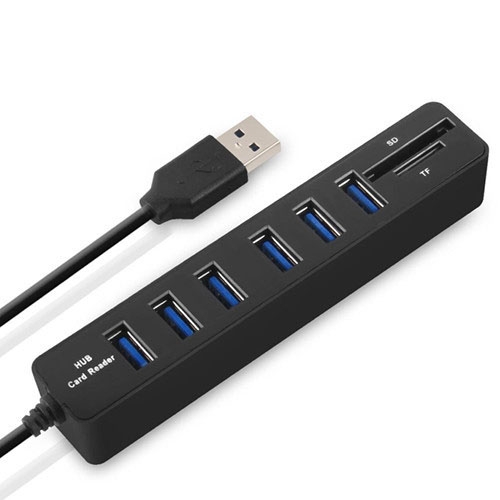
We carry the Multi USB 2.0 Hub USB Splitter with 6 Ports and built-in TF/SD card reader. Here’s why a 6-port hub might be exactly what your desk needs.
The 6-Port Hub with Card Reader
Our Multi USB 2.0 Hub features:
- 6× USB 2.0 ports: For connecting multiple peripherals
- SD card slot: For importing photos from camera cards
- TF (MicroSD) card slot: For phone/drone storage cards
- USB 2.0 speed: 480 Mbps shared across all ports
- Plug and play: No drivers required
- Compact design: Designed for desktop placement
Who Needs 6 USB Ports?
The Home Office Worker
Typical setup: keyboard (1 port), mouse (1 port), webcam (1 port), printer (1 port), flash drive (1 port), phone charging cable (1 port). That’s 6 ports — exactly what this hub provides.
The Content Creator
Typical setup: microphone (1 port), camera interface (1 port), external SSD for video storage (1 port), SD card reader for footage (1 port), keyboard (1 port), mouse (1 port). The built-in SD/TF reader eliminates the need for a separate card reader.
The Gamer
Typical setup: gaming keyboard (1 port), gaming mouse (1 port), headset (1 port), controller charger (1 port), capture card (1 port), USB fan (1 port). Six ports cover all gaming peripherals.
The Student
Typical setup: keyboard (1 port), mouse (1 port), flash drive (1 port), phone charger (1 port), portable HDD for backups (1 port), webcam for online classes (1 port).
USB 2.0 Speeds: Is 480 Mbps Enough?
This hub uses USB 2.0 (480 Mbps), which is sufficient for most peripherals but has limitations:
USB 2.0 Handles Perfectly
- Keyboards, mice, trackballs
- Webcams (720p and 1080p compressed video)
- Printers and scanners
- Bluetooth adapters
- USB audio interfaces (most are USB 2.0)
- SD card reader (SD cards rarely exceed 100 MB/s)
USB 2.0 Struggles With
- External SSDs (limited to 60 MB/s instead of 500+ MB/s)
- 4K webcams (need USB 3.0 bandwidth)
- Video capture devices (need USB 3.0 for uncompressed video)
- Large file transfers (50GB takes 15 minutes vs 90 seconds on USB 3.0)
If your setup includes external SSDs or video capture devices, consider a USB 3.0 hub like the A-809 4-Port Aluminum Hub instead.
Power Sharing Across 6 Ports
The hub is bus-powered (draws power from the computer’s USB port). Total available power is 500mA (USB 2.0), shared across all connected devices:
- Keyboard + mouse: ~100mA total — no problem
- Webcam + keyboard + mouse: ~350mA — fine
- 6 devices, all low-power: ~300mA — works well
- External HDD (500mA) + any other device: Exceeds budget — may cause disconnects
For external hard drives, use a powered USB hub or connect the drive directly to the computer. The 6-port hub is designed for low-power peripherals.
Built-in SD/TF Card Reader
The integrated SD and TF (MicroSD) card slots are a significant value-add. You no longer need a separate USB card reader:
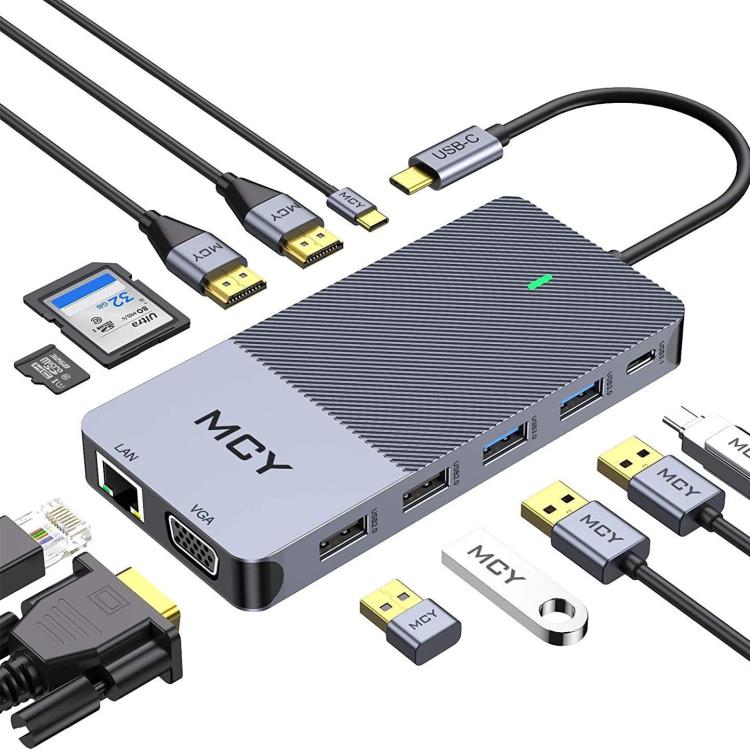
- SD card slot: Full-size SD cards used in cameras and camcorders
- TF card slot: MicroSD cards used in phones, drones, and action cameras
- Simultaneous use: Both slots works at the same time
- Transfer speed: Limited by USB 2.0 (480 Mbps) — fine for photos, slow for 4K video files
Comparing Our USB Hubs
| Hub | Ports | USB Version | Card Reader | Material | Best For |
|---|---|---|---|---|---|
| Multi USB 2.0 Hub | 6× USB 2.0 | USB 2.0 | SD + TF | Plastic | Peripheral-heavy setups |
| A-809 Aluminum | 4× USB 3.0 | USB 3.0 | No | Aluminum | High-speed data transfer |
| AH-A13 | 1× USB 3.0 + 3× USB 2.0 | Mixed | No | Standard | Cost-effective expansion |
Desktop Placement Tips
- Position near peripherals: Place the hub within reach of your keyboard, mouse, and other devices to minimize cable length
- Avoid stacking: Don’t stack devices on top of the hub — it needs airflow for cooling
- Label cables: With 6 ports, it’s easy to lose track of which cable goes where
- Use short cables: 0.3m or 0.5m cables reduce clutter when devices are near the hub
- Keep high-power devices off the hub: Connect external drives directly to the computer