


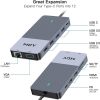


MCY 12-In-1 USB-C Hub With Triple Monitor Support (1…
$51.04
MCY 12-In-1 USB-C Hub With Triple Monitor Support (1…, 1000m, fast charging. Quality build from USBtoUSB. 18-month warranty, free shipping on $50+.
100 in stock
Extra Features
- Premium Quality
- Secure Payments
- Satisfaction Guarantee
- Worldwide Shipping
- Money Back Guarantee
MCY 12-In-1 USB-C Hub With Triple Monitor Support (1…
Get the connection you need with this accessory from USBtoUSB. Supports fast charging to keep your devices powered up quickly. Also handles data transfer between devices when you need it. Built with quality materials that resist wear and outlast ordinary cables.
Key Features
- Fast Charging — Delivers rapid power to compatible devices
- Data Transfer — Sync files between devices at dependable speeds
- 1000m Length — Convenient reach for desk, car, or nightstand setups
- Durable Build — Quality connectors and insulation designed for daily use
- Wide Compatibility — Works with a broad range of devices and chargers
Why Choose USBtoUSB?
Every product is tested for quality and safety. Backed by an 18-month warranty and free shipping on orders over $50.
Specifications
| Product | MCY 12-In-1 USB-C Hub With Triple Monitor Support (1… |
| Length | 1000m |
| Power | 85W |
| Warranty | 18 months |
| Weight | 0.124 kg |
|---|---|
| Dimensions | 14 × 12 × 4 cm |
45 reviews for MCY 12-In-1 USB-C Hub With Triple Monitor Support (1…
Only logged in customers who have purchased this product may leave a review.
Related products
-
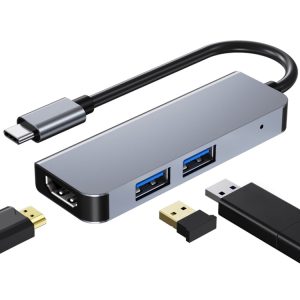
3 In 1 USB-C / Type-C To 4K HDMI + 2 USB 3.0 Ports M…
$23.78 -
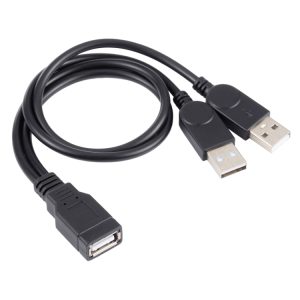
USB Female to 2 USB Male Cable
$15.75 -
USB 2.0 AM to AM Extension Cable
$15.71 -
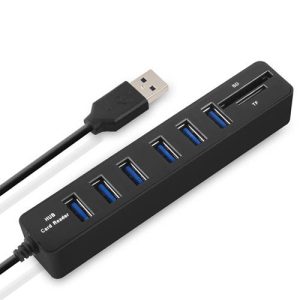
Multi USB 2.0 Hub USB Splitter High Speed 6 Ports wi…
$17.17Select options This product has multiple variants. The options may be chosen on the product page
Megan C. –
Finally threw away that fire hazard charger I’d been using for years. This one is proper — UL listed, doesn’t get hot, actually delivers the rated wattage. My phone used to take 2+ hours to charge, now it’s done in under an hour. Why did I wait so long?
Hunter S. (verified owner) –
Gets warm.
Lydia C. –
Using this with my MacBook Air that only has 2 USB-C ports! PD passthrough means I can charge while using all the peripherals. HDMI output is crisp at 4K, USB 3.0 drives show up instantly, SD card reader is a nice bonus. No drivers needed on macOS. No regrets.
Nolan R. (verified owner) –
Intermittent issues from day one. Sometimes fast charges, sometimes trickle charges with the same adapter and phone. I’ve tried different outlets, different adapters, and different orientations of the connector. Results are inconsistent. When it works it works well, but “when it works” shouldn’t be a caveat.
Gavin T. –
My work laptop only has one USB-C port and I need to connect a monitor, keyboard, mouse, ethernet, and charge it at the same time. This hub handles all of it. HDMI runs my 27″ 4K monitor without any flickering. Ethernet gets full gigabit speeds. PD passthrough keeps the laptop charged. The SD card slot is bonus for when I shoot photos. Gets slightly warm but nothing concerning. This is essentially my desktop dock now. Updated: still good.
Audrey V. –
Using this with my MacBook Air that only has 2 USB-C ports. PD passthrough means I can charge while using all the peripherals. HDMI output is crisp at 4K, USB 3.0 drives show up instantly, SD card reader is a nice bonus. No drivers needed on macOS. (Edit: still works great.)
Brayden A. –
Using this with my MacBook Air that only has 2 USB-C ports. PD passthrough means I can charge while using all the peripherals. HDMI output is crisp at 4K, USB 3.0 drives show up instantly, SD card reader is a nice bonus. No drivers needed on macOS. No regrets.
Cooper P. (verified owner) –
Using this with my MacBook Air that only has 2 USB-C ports. PD passthrough means I can charge while using all the peripherals. HDMI output is crisp at 4K, USB 3.0 drives show up instantly, SD card reader is a nice bonus. No drivers needed on macOS.
Kayla A. (verified owner) –
Using this with my MacBook Air that only has 2 USB-C ports. PD passthrough means I can charge while using all the peripherals. HDMI output is crisp at 4K, USB 3.0 drives show up instantly, SD card reader is a nice bonus. No drivers needed on macOS. (Edit: still works great.)
Levi R. (verified owner) –
My work laptop only has one USB-C port and I need to connect a monitor, keyboard, mouse, ethernet, and charge it at the same time. This hub handles all of it. HDMI runs my 27″ 4K monitor without any flickering. Ethernet gets full gigabit speeds. PD passthrough keeps the laptop charged. The SD card slot is bonus for when I shoot photos. Gets slightly warm but nothing concerning. This is essentially my desktop dock now. Still going.
Jack P. (verified owner) –
Using this with my MacBook Air that only has 2 USB-C ports. PD passthrough means I can charge while using all the peripherals. HDMI output is crisp at 4K, USB 3.0 drives show up instantly, SD card reader is a nice bonus. No drivers needed on macOS. Updated: still good.
Austin M. (verified owner) –
My work laptop only has one USB-C port and I need to connect a monitor, keyboard, mouse, ethernet, and charge it at the same time. This hub handles all of it. HDMI runs my 27″ 4K monitor without any flickering. Ethernet gets full gigabit speeds. PD passthrough keeps the laptop charged. The SD card slot is bonus for when I shoot photos. Gets slightly warm but nothing concerning. This is essentially my desktop dock now. Recommended.
Oscar A. (verified owner) –
Using it with my Steam Deck. Fits perfectly and charges while playing.
Isaac W. (verified owner) –
Using this with my MacBook Air that only has 2 USB-C ports. PD passthrough means I can charge while using all the peripherals. HDMI output is crisp at 4K, USB 3.0 drives show up instantly, SD card reader is a nice bonus. No drivers needed on macOS. Recommended.
Jace E. (verified owner) –
No hiccups, no disconnects, no drama. Just works. (Edit: still works great.)
Nina V. (verified owner) –
Finally cleaned up the cable mess on my desk. One USB-C connection does it all.
Tim B. (verified owner) –
My work laptop only has one USB-C port and I need to connect a monitor, keyboard, mouse, ethernet, and charge it at the same time. This hub handles all of it. HDMI runs my 27″ 4K monitor without any flickering. Ethernet gets full gigabit speeds. PD passthrough keeps the laptop charged. The SD card slot is bonus for when I shoot photos. Gets slightly warm but nothing concerning. This is essentially my desktop dock now. (Edit: still works great.)
Ryan B. (verified owner) –
All ports work.
Alex H. (verified owner) –
Bought this specifically for a trip to Japan where outlets are scarce in hotel rooms. Charged my phone, tablet, and camera battery from one outlet. The hotel room layout was awful but this charger made it work. Coming from someone who overpacks chargers, this replaced three of them.
Mark D. (verified owner) –
Using this with my MacBook Air that only has 2 USB-C ports. PD passthrough means I can charge while using all the peripherals. HDMI output is crisp at 4K, USB 3.0 drives show up instantly, SD card reader is a nice bonus. No drivers needed on macOS. Still going.
Liam H. (verified owner) –
My work laptop only has one USB-C port and I need to connect a monitor, keyboard, mouse, ethernet, and charge it at the same time. This hub handles all of it. HDMI runs my 27″ 4K monitor without any flickering. Ethernet gets full gigabit speeds. PD passthrough keeps the laptop charged. The SD card slot is bonus for when I shoot photos. Gets slightly warm but nothing concerning. This is essentially my desktop dock now. Still going.
Mike F. –
Using this with my MacBook Air that only has 2 USB-C ports. PD passthrough means I can charge while using all the peripherals. HDMI output is crisp at 4K, USB 3.0 drives show up instantly, SD card reader is a nice bonus. No drivers needed on macOS. No regrets.
Brian H. –
Using this with my MacBook Air that only has 2 USB-C ports. PD passthrough means I can charge while using all the peripherals. HDMI output is crisp at 4K, USB 3.0 drives show up instantly, SD card reader is a nice bonus. No drivers needed on macOS. Still going.
Sarah G. (verified owner) –
Using this with my MacBook Air that only has 2 USB-C ports. PD passthrough means I can charge while using all the peripherals. HDMI output is crisp at 4K, USB 3.0 drives show up instantly, SD card reader is a nice bonus. No drivers needed on macOS. Still going.
Jess C. –
Ran dual monitors + keyboard + mouse through this. No lag at all.
Levi W. (verified owner) –
Works well but gets noticeably warm during extended use. Keep it ventilated. No regrets.
Nevaeh T. –
Using this with my MacBook Air that only has 2 USB-C ports. PD passthrough means I can charge while using all the peripherals. HDMI output is crisp at 4K, USB 3.0 drives show up instantly, SD card reader is a nice bonus. No drivers needed on macOS. No regrets.
Claire P. (verified owner) –
My work laptop only has one USB-C port and I need to connect a monitor, keyboard, mouse, ethernet, and charge it at the same time. This hub handles all of it. HDMI runs my 27″ 4K monitor without any flickering. Ethernet gets full gigabit speeds. PD passthrough keeps the laptop charged. The SD card slot is bonus for when I shoot photos. Gets slightly warm but nothing concerning. This is essentially my desktop dock now. Updated: still good.
Jen C. –
Plug and play. Updated: still good.
Ryan T. –
Intermittent issues from day one. Sometimes fast charges, sometimes trickle charges with the same adapter and phone. I’ve tried different outlets, different adapters, and different orientations of the connector. Results are inconsistent. When it works it works well, but “when it works” shouldn’t be a caveat. Updated: still good.
Lydia F. (verified owner) –
Does exactly one thing and does it well. Novel concept these days.
Rachel W. (verified owner) –
No hiccups, no disconnects, no drama. Just works.
Liam B. (verified owner) –
Plug and play.
Tucker Z. –
My work laptop only has one USB-C port and I need to connect a monitor, keyboard, mouse, ethernet, and charge it at the same time. This hub handles all of it. HDMI runs my 27″ 4K monitor without any flickering. Ethernet gets full gigabit speeds. PD passthrough keeps the laptop charged. The SD card slot is bonus for when I shoot photos. Gets slightly warm but nothing concerning. This is essentially my desktop dock now. Still going.
Violet B. –
Mostly good.
Blake E. (verified owner) –
My work laptop only has one USB-C port and I need to connect a monitor, keyboard, mouse, ethernet, and charge it at the same time. This hub handles all of it. HDMI runs my 27″ 4K monitor without any flickering. Ethernet gets full gigabit speeds. PD passthrough keeps the laptop charged. The SD card slot is bonus for when I shoot photos. Gets slightly warm but nothing concerning. This is essentially my desktop dock now. Recommended.
Dylan Z. (verified owner) –
Works well but gets noticeably warm during extended use. Keep it ventilated. Updated: still good.
Matt D. (verified owner) –
My work laptop only has one USB-C port and I need to connect a monitor, keyboard, mouse, ethernet, and charge it at the same time. This hub handles all of it. HDMI runs my 27″ 4K monitor without any flickering. Ethernet gets full gigabit speeds. PD passthrough keeps the laptop charged. The SD card slot is bonus for when I shoot photos. Gets slightly warm but nothing concerning. This is essentially my desktop dock now.
Owen V. (verified owner) –
4 stars because nothing’s perfect. But this is close.
Kayla S. (verified owner) –
My work laptop only has one USB-C port and I need to connect a monitor, keyboard, mouse, ethernet, and charge it at the same time. This hub handles all of it. HDMI runs my 27″ 4K monitor without any flickering. Ethernet gets full gigabit speeds. PD passthrough keeps the laptop charged. The SD card slot is bonus for when I shoot photos. Gets slightly warm but nothing concerning. This is essentially my desktop dock now. No regrets.
Jordan A. (verified owner) –
My work laptop only has one USB-C port and I need to connect a monitor, keyboard, mouse, ethernet, and charge it at the same time. This hub handles all of it. HDMI runs my 27″ 4K monitor without any flickering. Ethernet gets full gigabit speeds. PD passthrough keeps the laptop charged. The SD card slot is bonus for when I shoot photos. Gets slightly warm but nothing concerning. This is essentially my desktop dock now. No regrets.
Ryan J. (verified owner) –
Works well but gets noticeably warm during extended use. Keep it ventilated.
Samantha H. (verified owner) –
HDMI handles my 4K monitor at 60Hz no problem, my old hub could only do 30Hz.
Daniel F. (verified owner) –
Picked this up after my old one finally gave out. Aluminium housing stays cool even after hours of use, my plastic one used to get hot. Finally ditched my collection of dongles for this one hub, desk is so much cleaner now. Can’t think of anything I’d change about it.
Hannah D. –
Overall pretty decent, a few minor things but nothing deal-breaking. SD card slot works but the card sticks out a fair bit, feels like it could snap. HDMI works at 4K but occasionally flickers, might be my monitor’s fault honestly. Don’t usually leave reviews but this exceeded my expectations.