Dual USB Y-Cables: When and Why You Need Extra Power

What Is a USB Y-Cable?
A USB Y-cable splits one USB connection into two — typically one data/power connection and one power-only connection. The name comes from the Y-shaped split where one end becomes two. We carry several Y-cable variants, including the USB Female to 2 USB Male Cable and the 2-in-1 USB 2.0 Male to 2 Dual USB Male Cable.
Why USB Y-Cables Exist
Standard USB 2.0 ports deliver 500mA (2.5W) of power. Some devices — particularly external hard drives, optical drives, and high-power peripherals — require more than 500mA to operate reliably. A Y-cable connects to two USB ports simultaneously, drawing power from both to deliver the combined current the device needs.
USB 3.0 ports deliver 900mA, reducing the need for Y-cables for most modern devices. However, many users still have USB 2.0 ports or devices that draw more than 900mA, making Y-cables relevant in 2026.
Types of USB Y-Cables We Carry
USB Female to 2 USB Male Cable (30cm)
This Y-cable has one USB-A female receptacle on one end and two USB-A male plugs on the other. The female end connects to your device’s existing cable, while the two male ends connect to two USB ports on your computer. One plug carries data + power; the other carries power only.
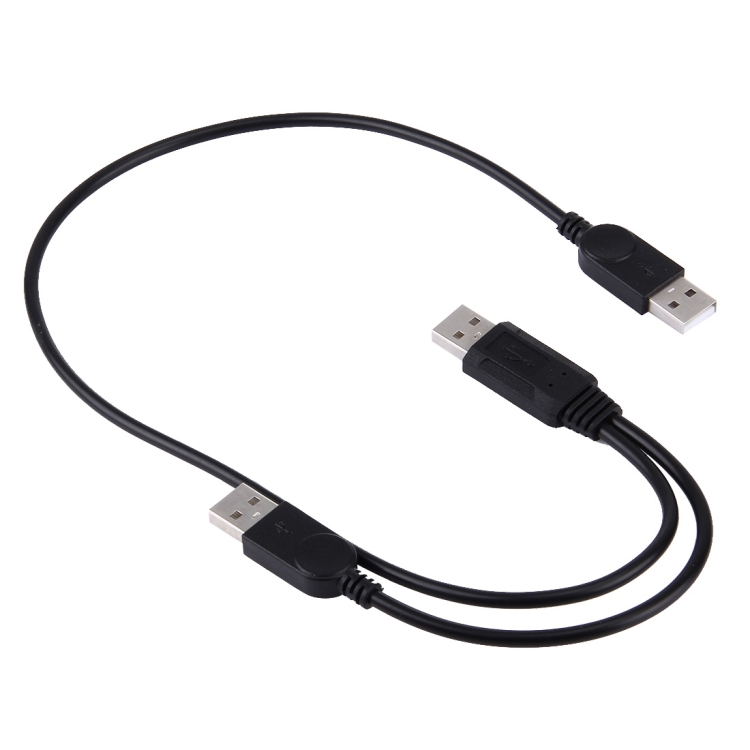
2-in-1 USB 2.0 Male to 2 Dual USB Male Cable (50cm)
This variant has two USB-A male plugs on one end and splits into two separate USB-A male plugs on the other. It’s used for connecting a device that requires more power than a single USB port can provide.
USB 2.0 Male to 2 Dual USB Female Jack Adapter (30cm)
This is a USB splitter — one USB-A male plug on one end splits to two USB-A female receptacles. It allows you to connect two USB devices to a single USB port. Note that data bandwidth is shared between the two devices, and power is split between them.
When You Need a USB Y-Cable
External Hard Drives That Won’t Spin Up
2.5″ external HDDs typically need 500-800mA to spin up. On USB 2.0 ports that deliver exactly 500mA, the drive may click repeatedly but fail to start. A Y-cable draws power from two ports, providing 1000mA (5W) — more than enough for any 2.5″ drive.
USB-Powered Optical Drives
External CD/DVD drives often require 1A or more during disc spin-up. A single USB 2.0 port can’t deliver this. A Y-cable provides the necessary current without requiring an external power adapter.
USB Cooling Pads and Fans
High-performance laptop cooling pads with multiple fans can exceed 500mA. A Y-cable ensures all fans run at full speed without USB port overcurrent warnings.
Multiple Devices on One Port
The USB female-to-dual-female splitter lets you connect two low-power devices (like a keyboard and mouse) to a single USB port. This is useful for laptops with limited USB ports or when using a USB hub isn’t desired.
USB Y-Cable Limitations
Data Only on One Branch
In a power Y-cable, only one of the two male plugs carries data. The second plug is power-only. This means the device communicates through one USB port while drawing additional power from the second. You can’t transfer data through both branches simultaneously.
USB 2.0 Speed Limitation
Our Y-cables are USB 2.0 rated (480 Mbps). This is fine for hard drives (which rarely exceed 100 MB/s In practice transfer) but insufficient for USB 3.0 SSDs. If you have a USB 3.0 external SSD, use a single USB 3.0 cable rather than a Y-cable.
Port Availability
Y-cables consume two USB ports for one device. On laptops with limited ports, this can be a significant trade-off. Consider whether the device truly needs extra power or whether a powered USB hub would a better solution.
USB Y-Cable vs Powered USB Hub
| Feature | Y-Cable | Powered USB Hub |
|---|---|---|
| Cost | $5-$8 | $15-$40 |
| Ports used | 2 (for 1 device) | 1 (for multiple devices) |
| Extra power | From second USB port | From wall adapter |
| Best for | One high-power device | Multiple devices |
| USB version | USB 2.0 | USB 2.0 or 3.0 |
If you have only one high-power device, a Y-cable is cheaper and simpler. If you have multiple devices that need extra power, a powered USB hub is more efficient.