USB Female to Dual USB Female Adapters: Splitting Ports Safely

Understanding USB Port Splitting
You have one USB port and two devices. Can you simply split the port with a Y-adapter and use both? The short answer is yes — but with important caveats about power, data, and speed that every user should understand before connecting.
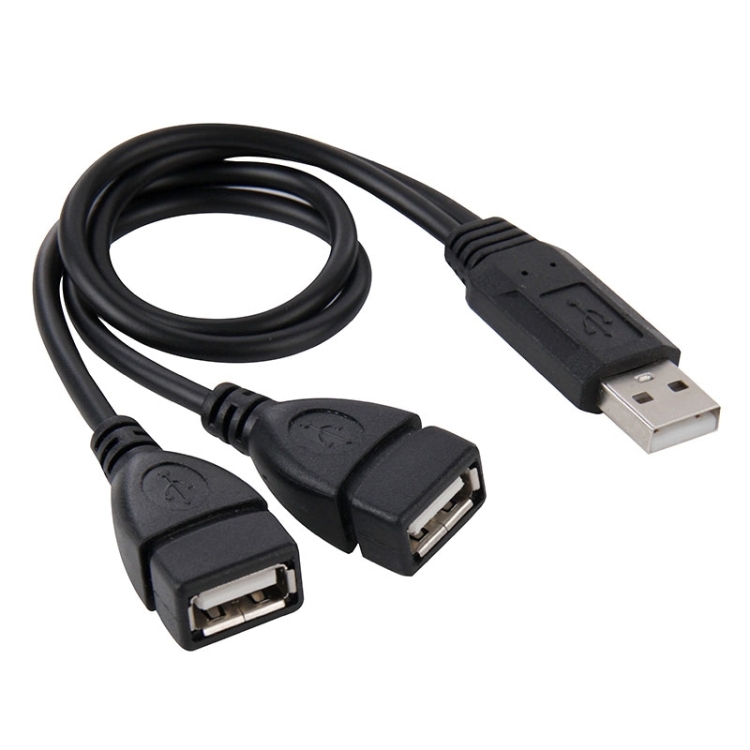
At USBToUSB, we carry the USB 2.0 Male to 2 Dual USB Female Jack Adapter Cable (30cm). This cable splits one USB-A male plug into two USB-A female receptacles. Here’s what you need to know about using it safely and effectively.
How USB Port Splitters Work
A USB port splitter (not to be confused with a USB hub) simply connects one USB port to two female receptacles. The splitter is a passive device — no electronics, no power management, no data switching. Both female ports share the same data lines and power from the original port.
This is fundamentally different from a USB hub, which contains a controller chip that manages data flow between multiple devices and the host. A splitter has no such intelligence.
Power Sharing: The 500mA Problem
USB 2.0 ports deliver 500mA total. When you connect two devices via a splitter, they share that 500mA:
- Keyboard (50mA) + Mouse (50mA): 100mA total — works perfectly
- Keyboard (50mA) + Flash drive (200mA): 250mA — works fine
- Flash drive (200mA) + External HDD (500mA): 700mA — won’t work (overcurrent)
- Two flash drives (200mA each): 400mA — borderline, may cause disconnects
USB 3.0 ports deliver 900mA, giving more headroom. But the fundamental limitation remains: the splitter shares power between devices, with no active management.
Data Sharing: One Device at a Time
USB is a point-to-point protocol — one host communicates with one device at a time. With a passive splitter, only one of the two connected devices can communicate at any given moment. If both devices try to send data simultaneously, collisions occur and data corruption can result.
In practice, this means:
- Keyboard + mouse: Works fine because input is intermittent — each device transmits briefly and releases the bus
- Two flash drives: Won’t work reliably — both are storage devices that expect full bus access
- Flash drive + printer: Usually works because the printer only sends data when actively printing
USB Splitter vs USB Hub: What’s the Difference?
| Feature | USB Splitter (Passive) | USB Hub (Active) |
|---|---|---|
| Controller chip | No | Yes |
| Port management | Shared bus | Dedicated bandwidth per port |
| Simultaneous data | No (one at a time) | Yes |
| Power management | Shared (no isolation) | Per-port current limiting |
| Cost | $3-$5 | $10-$40 |
| USB version | USB 2.0 | USB 2.0, 3.0, 3.1 |
| Number of ports | 2 | 4-12 |
For two low-power, intermittently-used devices (keyboard + mouse), a splitter works fine and saves money. For anything else, a USB hub is the better choice.
Best Use Cases for USB Splitters
Keyboard + Mouse Sharing
The most common legitimate use. A keyboard draws 50mA and a mouse draws 50mA — together they use only 100mA, well within the 500mA budget. Data communication is intermittent (only when you type or move the mouse), so bus contention isn’t an issue.
Low-Power Peripheral +偶尔 USB Device
Connect a Bluetooth dongle (50mA, always active) and occasionally plug in a USB flash drive. The dongle uses minimal bandwidth, leaving most of the bus available for the flash drive when connected.
Diagnostic and Testing
In electronics testing, a splitter can connect a USB multimeter and a test device simultaneously. The multimeter draws minimal power and sends data only when queried.
When to Use a USB Hub Instead
- Two storage devices: Use a hub — storage devices need dedicated bandwidth
- Any USB 3.0 device: Splitters are USB 2.0 only; use a USB 3.0 hub for USB 3.0 devices
- High-power devices: External HDDs, SSDs, or USB-powered fans need a powered hub
- More than 2 devices: Hubs offer 4-12 ports
- Devices that transfer data simultaneously: Only a hub manages multiple data streams
Safety Considerations
Passive splitters don’t have overcurrent protection. If you connect two high-power devices, you risk triggering the USB port’s overcurrent protection (which shuts down the port) or, on poorly designed motherboards, damaging the port.
Always check your device’s power requirements before connecting them to a splitter. If the combined current exceeds 500mA (USB 2.0) or 900mA (USB 3.0), use a powered USB hub instead.
Our USB 2.0 Dual Female Adapter
The USB 2.0 Male to 2 Dual USB Female Jack Adapter Cable (30cm) is a passive splitter with a 30cm cable between the male plug and the dual female connectors. The cable length provides flexibility in positioning the connected devices, and the 30cm length is short enough to avoid signal degradation.