MagSafe to USB-C Adapters: Bridging Apple’s Old and

The MagSafe to USB-C Transition
Apple’s switch from MagSafe to USB-C created a problem for users with older MagSafe chargers and newer USB-C MacBooks — and vice versa. MagSafe to USB-C adapters bridge this gap, letting you use older chargers with newer laptops or newer chargers with older MacBooks.
We carry MagSafe AC adapters for MacBook Pro (60W, 85W, and 45W variants) and USB-C chargers like the A3365 PD40W. Here’s what you need to know about bridging Apple’s charging standards.
Understanding MagSafe Generations
MagSafe 1 (2006-2012)
The original MagSafe connector with a T-shaped or L-shaped magnetic tip. Used on MacBook, MacBook Pro (13″, 15″, 17″), and MacBook Air (2006-2011 models). Available in 45W, 60W, and 85W variants.
MagSafe 2 (2012-2017)
Thinner, wider magnetic connector introduced with the Retina MacBook Pro. Used on MacBook Pro Retina, MacBook Air (2012-2017). Available in 45W (MacBook Air) and 60W/85W (MacBook Pro).
USB-C (2015-present)
All MacBooks since 2015 use USB-C for charging. The MacBook (2015-2017) uses a single USB-C port for charging, data, and video. MacBook Pro (2016+) and MacBook Air (2018+) use USB-C/Thunderbolt ports.
MagSafe 3 (2021-present)
Apple reintroduced MagSafe with the MacBook Pro 14″ and 16″ (M1 Pro/Max and later). MagSafe 3 uses a magnetic cable that connects to a USB-C power adapter — the wall charger is USB-C, but the laptop end is magnetic.
MagSafe AC Adapters We Carry
60W MagSafe AC Adapter (US/UK Plug)
For MacBook Pro 13″ (2009-2012 models with MagSafe 1). Also compatible with older MacBook (13″) models. Available in US and UK plug variants.
85W MagSafe AC Adapter (US/UK/AU Plug)
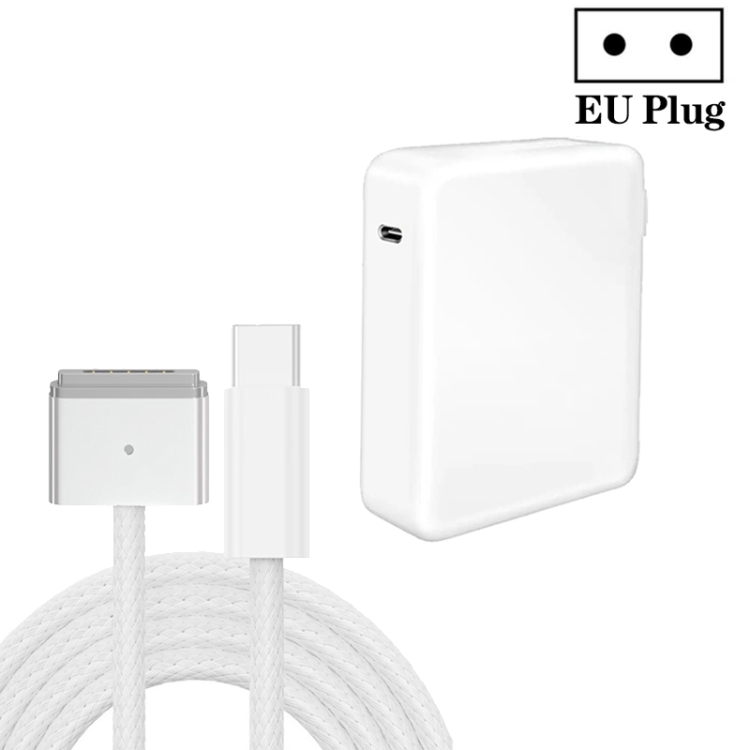
For MacBook Pro 15″ and 17″ (2009-2012 models with MagSafe 1). Also charges 13″ models at full speed. Available in US, UK, and AU plug variants for international compatibility.
45W MagSafe Adapter
For MacBook Air (2008-2011 models with MagSafe 1). The lower wattage matches the Air’s charging requirements.
Can You Use USB-C Chargers with MagSafe MacBooks?
Yes — with the right adapter. A USB-C to MagSafe adapter cable converts USB-C PD output to MagSafe 1 or MagSafe 2 input. The adapter handles voltage conversion (USB-C PD negotiates the correct voltage) and connector adaptation.
Key considerations:
- Wattage matching: Ensure the USB-C charger delivers at least as much wattage as the original MagSafe charger. A 65W USB-C charger works with 60W MagSafe MacBooks.
- Voltage compatibility: MagSafe 1/2 operates at 14.5V-20V. USB-C PD provides 5V/9V/15V/20V. The adapter negotiates 20V from the USB-C charger and converts it to the MagSafe voltage.
- Charging speed: Charging speed matches the MagSafe charger’s original rating. USB-C PD doesn’t make older MacBooks charge faster.
Can You Use MagSafe Chargers with USB-C MacBooks?
No. MagSafe chargers output DC power at a fixed voltage (14.5V or 16.5V) without USB PD negotiation. USB-C MacBooks require PD negotiation to accept power — they won’t charge from a MagSafe charger even with a physical adapter.
If you have a MagSafe charger and a USB-C MacBook, you need to buy a USB-C charger. The A3365 PD40W (available in US, EU, UK plugs) is an excellent replacement.
MagSafe vs USB-C: Which Is Better?
MagSafe Advantages
- Magnetic breakaway: If someone trips over the cable, the connector detaches safely without pulling the laptop off the desk
- LED indicator: Amber/green LED shows charging status at a glance
- Dedicated charging port: Doesn’t occupy a data port
USB-C Advantages
- Universal compatibility: Works with non-Apple devices
- Data and video: Same port handles charging, data, and display output
- Higher power: USB-C PD supports up to 240W (vs MagSafe’s 85W maximum)
- Reversible connector: No wrong way to plug in
- Wider accessory landscape: Thousands of USB-C accessories available
Magnetic USB-C Adapters: The Best of Both Worlds
If you miss MagSafe’s magnetic breakaway feature on your USB-C MacBook, our 100W USB-C Female to 20 Pin Magnetic USB-C Male Elbow Adapter adds magnetic disconnect to any USB-C charging cable. The adapter separates into two pieces — one stays in the laptop’s USB-C port, and the cable attaches magnetically.
Benefits:
- Trip protection: Cable detaches if pulled, preventing laptop falls
- Wear reduction: Reduces wear on the laptop’s USB-C port by leaving the adapter inserted
- 90-degree elbow: Directs cable parallel to the laptop, saving space
- 100W support: Handles full USB-C PD power delivery
Choosing Replacement Chargers for Older MacBooks
If your original MagSafe charger has failed, here’s what to buy:
- MacBook Air (2008-2011): 45W MagSafe 1 adapter
- MacBook Pro 13″ (2009-2012): 60W MagSafe 1 adapter (US or UK plug)
- MacBook Pro 15″/17″ (2009-2012): 85W MagSafe 1 adapter (US, UK, or AU plug)
- MacBook Air (2012-2017): 45W MagSafe 2 adapter
- MacBook Pro Retina 13″ (2012-2015): 60W MagSafe 2 adapter
- MacBook Pro Retina 15″ (2012-2015): 85W MagSafe 2 adapter
- MacBook (2015-2017): 29W USB-C charger
- MacBook Air (2018+): 30W USB-C charger (A3365 PD40W works)
- MacBook Pro 13″ (2016+): 61W USB-C charger
- MacBook Pro 14″ (2021+): 67W USB-C charger or MagSafe 3 with USB-C adapter