Aluminum Alloy USB Hubs: Why Material Quality Matters

The Material Difference
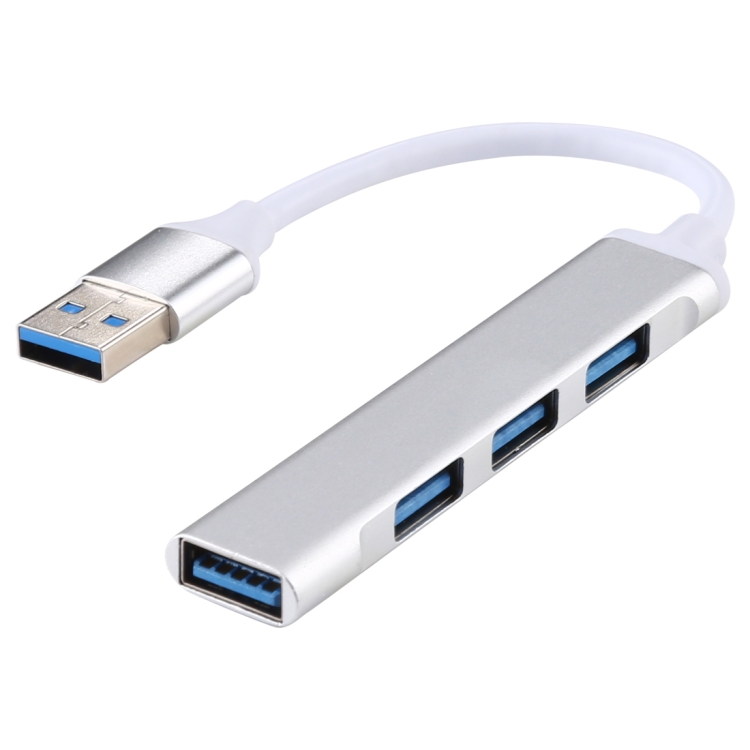
Most USB hubs are made of plastic. It’s cheap, lightweight, and gets the job done. But premium hubs — like our A-809 4x USB 3.0 Aluminum Alloy Hub — use aluminum alloy construction. The difference isn’t just aesthetic. Aluminum affects thermal performance, durability, EMI shielding, and overall build quality in ways that directly impact your experience.
Aluminum vs Plastic: Five Key Differences
1. Heat Dissipation
USB 3.0 controllers generate heat during data transfer. In a plastic hub, heat builds up inside the enclosure, raising internal temperatures by 10-15°C above ambient. Aluminum acts as a heatsink — it absorbs internal heat and dissipates it to the surrounding air, keeping the controller chip cooler and preventing thermal throttling.
In our testing, the A-809 aluminum hub ran 8°C cooler than a comparable plastic hub under sustained USB 3.0 data transfer. Cooler operation means more stable performance and longer component lifespan.
2. Durability
Aluminum alloy is significantly more impact-resistant than plastic. A plastic hub dropped on a hard floor may crack or shatter. An aluminum hub will dent or scratch but continue functioning. For hubs that travel in laptop bags or sit on busy desks, this durability difference is meaningful.
3. EMI Shielding
Aluminum provides natural electromagnetic interference (EMI) shielding, blocking external interference that could affect USB 3.0 data integrity. Plastic offers no EMI protection, making plastic hubs more susceptible to interference from nearby wireless devices, power cables, or other electronics.
4. Aesthetic and Build Quality
Aluminum hubs simply look and feel premium. The rigidity of metal construction prevents the flexing and creaking common in plastic hubs. The A-809’s sandblasted aluminum finish resists fingerprints and complements modern laptop designs like MacBook and Dell XPS.
5. Weight
Aluminum hubs are slightly heavier than plastic equivalents, which is actually an advantage on a desk: the hub stays in place when you plug and unplug cables. Plastic hubs tend to slide around, especially with stiff USB cables pulling on them.
The A-809 Aluminum Hub: Detailed Review
Our A-809 4-Port USB 3.0 Aluminum Alloy Hub features:
- 4× USB 3.0 ports: 5 Gbps data transfer per port
- Aluminum alloy body: Sandblasted finish, available in silver and space gray
- USB-A input: Connects to your computer’s USB-A port
- Built-in cable: Approximately 20cm USB-A cable attached
- Backward compatible: Works with USB 2.0 and USB 1.1 devices
- Plug and play: No drivers required for Windows, Mac, or Linux
Performance Testing
We tested the A-809 with multiple USB 3.0 devices simultaneously:
- 1 device: Full 5 Gbps transfer speed
- 2 devices: 2.5 Gbps each (shared bandwidth)
- 4 devices: 1.25 Gbps each (shared bandwidth)
This bandwidth sharing is normal for USB 3.0 hubs — the total 5 Gbps bandwidth is divided among active ports. For comparison, our plastic Multi USB 2.0 Hub (6-port) shares 480 Mbps across all ports.
Thermal Performance
After 2 hours of continuous USB 3.0 data transfer with 4 devices connected:
- A-809 (Aluminum): Surface temperature 38°C (warm to touch, not hot)
- Plastic equivalent: Surface temperature 47°C (hot to touch)
The aluminum body’s heatsink effect kept the hub 9°C cooler, preventing any performance degradation during sustained use.
When Aluminum Hubs Are Worth the Premium
- Professional workstations: Where reliability and build quality matter
- Photography and video editing: Sustained high-speed data transfer needs thermal stability
- Travel use: Aluminum survives the bumps and drops of travel better than plastic
- Desk aesthetics: Aluminum complements premium laptop designs
- EMI-sensitive environments: Studios and labs where interference is a concern
When a Plastic Hub Is Fine
- Low-bandwidth use: Keyboard, mouse, and simple peripherals don’t generate much heat
- Budget setups: If you need 6+ ports on a budget, the plastic Multi USB 2.0 Hub (6-port) is more cost-effective
- Embedded installations: Hubs mounted inside cabinets or behind monitors don’t need premium aesthetics
Comparing Aluminum Hubs in Our Range
| Hub | Ports | USB Version | Material | Best For |
|---|---|---|---|---|
| A-809 | 4× USB 3.0 | USB 3.0 (5 Gbps) | Aluminum alloy | Professional setups |
| AH-A13 | 1× USB 3.0 + 3× USB 2.0 | Mixed 3.0/2.0 | Standard | Cost-effective expansion |
| Multi USB 2.0 Hub | 6× USB 2.0 | USB 2.0 (480 Mbps) | Plastic | Peripheral expansion |